How to Set Up Cold Email Infrastructure That Lands in the Primary Inbox
Sep 24
•
7
min read
Event-Led-Growth
Community-Led Growth
Pooja Baranigutta
A Founder Relations specialist focused on building meaningful connections and opportunities to support their growth.
Abhishek Patra, founder of Poso, has spent 18 months building the sending infrastructure behind SaaS companies and US agencies that send millions of emails every month.
At a recent GTMDialogues session, he showed how most cold email campaigns fail before anyone reads the first line. This blog follows the system he walked through. You'll see why he builds cold email backwards from revenue, what reply rates tell you a campaign is working, and how he sets up domains and mailboxes that inbox providers trust.
You'll also learn how he warms up new mailboxes, the limits he uses to decide when to pause a campaign, and how he writes and paces emails so they reach the primary inbox.
Why inbox placement decides your cold email results
Every cold email reply depends on sender trust
When you put time and money into cold email, you want replies, demos, pipeline and revenue. Abhishek's advice is to trace that result backwards, one stage at a time.
Revenue needs pipeline, and pipeline needs demos. For a sales-led company, a demo starts with a reply. For a product-led company, it starts with someone signing up after reading your email.
Either response needs your email to be seen, so it has to land in the primary inbox. Gmail and Microsoft only put it there when they trust you as a sender, and that trust rests on a healthy foundation.
The chain works in both directions, which is why Abhishek treats your setup and your campaigns as a single unit:
"If the infra is bad, the campaigns will not work. And if people are marking your campaigns as spam, that will affect the infrastructure. It's one connected system."
Track inbox placement instead of deliverability and opens
Most founders who want better results focus on their deliverability rate. A delivered email can still end up in spam, promotions or the social tab, where your prospect never sees it.
"Deliverability is a small aspect. The most important is placement. We want placement in the primary inbox. That's the goal."
Open rates mislead you in a similar way. Open tracking adds an invisible image pixel to every email, and that pixel signals to inbox providers that your message may belong in promotions.
The number you get back isn't reliable either. More than half of all email opens now happen on devices with Apple's Mail Privacy Protection switched on, which inflates open counts (Litmus). That's why Abhishek drops open tracking entirely and keeps every cold email in plain text.
What a healthy reply rate looks like when you send B2B cold email at scale
Before you judge a campaign, you need a benchmark based on how buying actually works. Research by the Ehrenberg-Bass Institute for LinkedIn's B2B Institute found that up to 95% of businesses aren't in the market for most goods and services at any one time (Ehrenberg-Bass Institute). marketingscience
Abhishek applies the same logic to cold email. If you email 100 well-targeted prospects, only four or five need your product right now, so most of your list won't reply no matter how strong your copy is.
By a human reply, he means a clear yes or no. Out-of-office messages and angry replies don't count, and at scale, positive replies land lower, around 0.3% to 0.4%.
Your industry and deal size move these numbers further. In one example he shared, US e-commerce and D2C brands are so hard to reach that 2,000 emails may not produce a single positive reply.
In another example, low-priced SMB products with a free trial perform well because buyers would rather sign up than book a call. For these companies, sign-ups replace replies as the number you track.
You'll also know quickly whether an email worked, since 90% to 95% of recipients reply within 24 hours or not at all.
How to set up domains and mailboxes for cold email
Never send cold email from your main company domain
Your main domain carries your company's reputation, so Abhishek uses it only for one-to-one emails and keeps it away from outreach at scale.
Instead, buy cheap lookalike domains that use variations of your brand name, and forward each one to your main website. Cap every domain at three mailboxes.
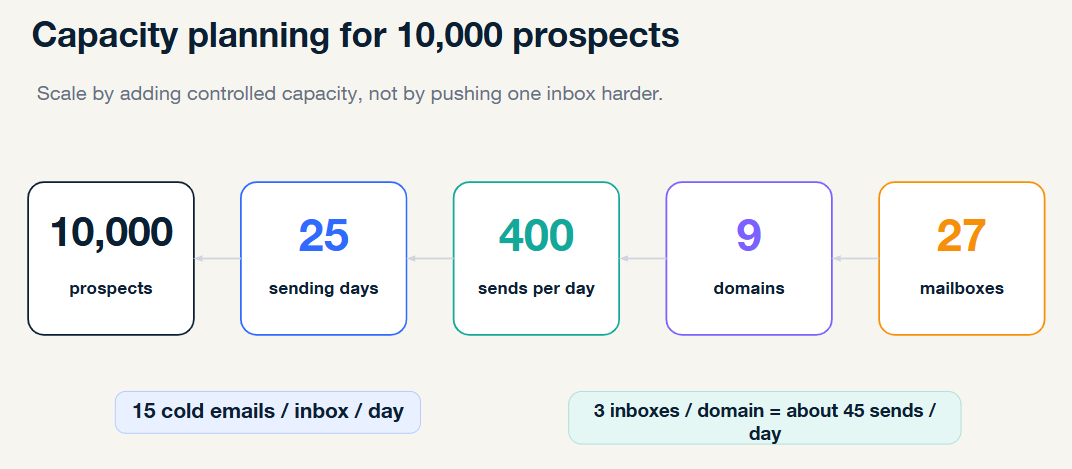
In one example, he showed the numbers for reaching 10,000 prospects in 30 days. He sends six days a week and keeps Sundays and holidays in the schedule, since positive replies run higher on Sundays than any other day.
That gives you 25 sending days and 400 emails a day. At 15 to 20 emails per mailbox, you need 9 domains and 27 mailboxes, and you raise volume gradually once a domain has performed well for 45 days.
Authenticate every domain and humanize every mailbox
Every sending domain needs SPF, DKIM and DMARC. Abhishek has seen even established agencies skip parts of this, and it breaks their campaigns at scale.
Since February 2024, Google has required all three for anyone sending more than 5,000 messages a day to Gmail accounts (Google). Google accepts a relaxed DMARC policy, but Abhishek sets it to reject so your authentication looks as strong as possible.
Each mailbox also needs a clear professional photo and a full first and last name. He calls these non-negotiable.
Split your mailboxes between Google Workspace and Microsoft
Cheap SMTP servers burn out within two to three weeks and leave you managing domains instead of selling. Stick to Google Workspace and Microsoft 365, or a managed provider that sets them up for you.
Buy roughly 70% Google and 30% Microsoft mailboxes. Your sequencer then matches each prospect to a mailbox on the same provider, which lands in the inbox more often.
At high volume, run at least two sequencers so a single platform outage can't stop every campaign at once.
How to warm up mailboxes and monitor inbox placement
Ramp new mailboxes slowly and never stop warm-up
Warm-up sends emails between your new mailboxes and a network of other inboxes, which move your emails out of spam and reply to them. Most sequencers include it for free.
Give new mailboxes at least 14 days, starting at 10 emails a day and building to 40. Two months is better, and enterprise prospects need aged domains warmed for at least that long.
When you start real sends, shift gradually: first 30 warm-up emails and 10 real ones, then 20 of each. Keep total daily volume under 50.
Warm-up keeps protecting you after launch. In one example Abhishek shared, five spam complaints from 30 real emails is an alarming rate, while the same five across 50 total sends looks far healthier.
"Warming up is an evergreen activity. It keeps going. It never stops."
Test placement weekly and pause at set limits
Warm-up scores don't show where your emails land, so run automated placement tests every week. Swap out any mailbox that lands poorly with Gmail or Outlook recipients.
Before launch, send a test to addresses that sent you out-of-office replies in earlier campaigns. If 80% to 90% reply again, your emails aren't landing in spam.
Domains wear out within three to four months, so keep a reserve fleet about half the size of your active setup warming in the background.
Pause any campaign that crosses these limits:
Metric
Pause when it reaches
Spam complaints
Above 0.1%
Hard bounces
Above 1%
Inbox placement
Below 95%
Google treats a 0.3% spam rate as the ceiling for senders to Gmail accounts (Google), so Abhishek's 0.1% limit gives you room to fix problems early.
How to write and send cold emails that reach the primary inbox
Verify your list twice before you send
Hard bounces damage your entire setup, so run every list through two verifiers in a row. Reach catch-all addresses through a separate campaign on separate domains.
Keep your copy plain, short and varied
Write three lines of plain text with no links, images or attachments, and focus on why your offer matters to this prospect now. Use spintax to vary your wording, because inbox providers fingerprint and filter identical emails sent to thousands of people.
Pace your sends and follow-ups like a human
Space your emails 9 to 11 minutes apart across the working day, the way a person would.
Limit follow-ups to one email with a fresh angle. Add an unsubscribe header so uninterested prospects opt out instead of marking you as spam.
Every piece of this setup feeds the next, so you'll see results only when your domains, warm-up, list and copy work together.
Measure positive replies, demos and pipeline, and automate your monitoring so you don't lose interest by week two.
Click here to access the presentation slides from the session.
Common questions asked about cold email infrastructure
Does cold email work if your total market is only 100 companies?
Yes, but skip bulk sending. Send a few handwritten emails a day from your own inbox, and follow up with a short video, a LinkedIn message or a call. Abhishek reserves the full setup for markets of at least 20,000 to 50,000 prospects.
Should you buy managed mailboxes or set up Google and Microsoft yourself?
Set them up yourself if you can manage authentication and replace burned domains on your own. Otherwise, managed providers handle authentication for you and let you swap domains in a few clicks. Either way, run your weekly placement tests.
How do you combine cold email with LinkedIn outreach?
First, check whether a prospect is active on LinkedIn, since messaging inactive profiles wastes your time. Then use automation tools to coordinate both channels and alert you when something breaks, so you aren't checking dashboards every morning.
Are intent signals worth building your cold email campaigns around?
Rarely. Signals like a new hire or a job change don't prove a prospect needs your product, and too many competitors chase the same small pool of accounts. Abhishek recommends going wide instead.
If you're scaling a B2B startup, GTMX Ventures helps founders with go-to-market and fundraising. Feel free to reach out.
Pooja Baranigutta
A Founder Relations specialist focused on building meaningful connections and opportunities to support their growth.

.png)



.png)

.png)
.png)